Guide
Xumo Stream Box vs Spectrum Cable Box: What's Different

Spectrum's Xumo Stream Box keeps the same channel lineup as your cable box but changes the hardware, remote, and audio experience. Here's what stays the same, what's different, and how to decide between them.
This analysis draws on TVChannelsGuide's Spectrum lineup data across 41 US cities, Spectrum's own product documentation, Xumo's published specs, FCC remote control filings, and hundreds of user reports from Spectrum's community forums and consumer tech publications. The short answer on channels is that they're the same. The hardware, remote, and audio experience are not.
Last verified: May 2026. Spectrum package names, Cloud DVR rules, device specs, and app behavior can vary by market and change over time.
Scope of this guide: The Xumo Stream Box is a joint-venture device from Charter (Spectrum's parent company) and Comcast, so the same hardware family also ships to Xfinity customers. This guide is specifically about how the Xumo behaves on Spectrum TV through the Spectrum TV app. Xfinity customers using the Xfinity Stream app on the same box will see different app behavior, different channel lineups, and different DVR rules.
The short version: the Xumo Stream Box gives you the same Spectrum channels at home plus 300+ streaming apps in one device, but you lose channel-surf-friendly remote buttons, surround sound on live cable channels, and the ability to watch TV when your home internet is down. If those three things matter to you, keep the cable box. If they don't, the Xumo may feel like a real upgrade.
Spectrum is steering subscribers toward the Xumo Stream Box as a replacement for the traditional set-top cable box. If you're a current Spectrum TV customer being offered one, or a new subscriber deciding whether to take the cable box or the Xumo, the channel lineup question is usually the first one to settle.
What the Xumo Stream Box actually is
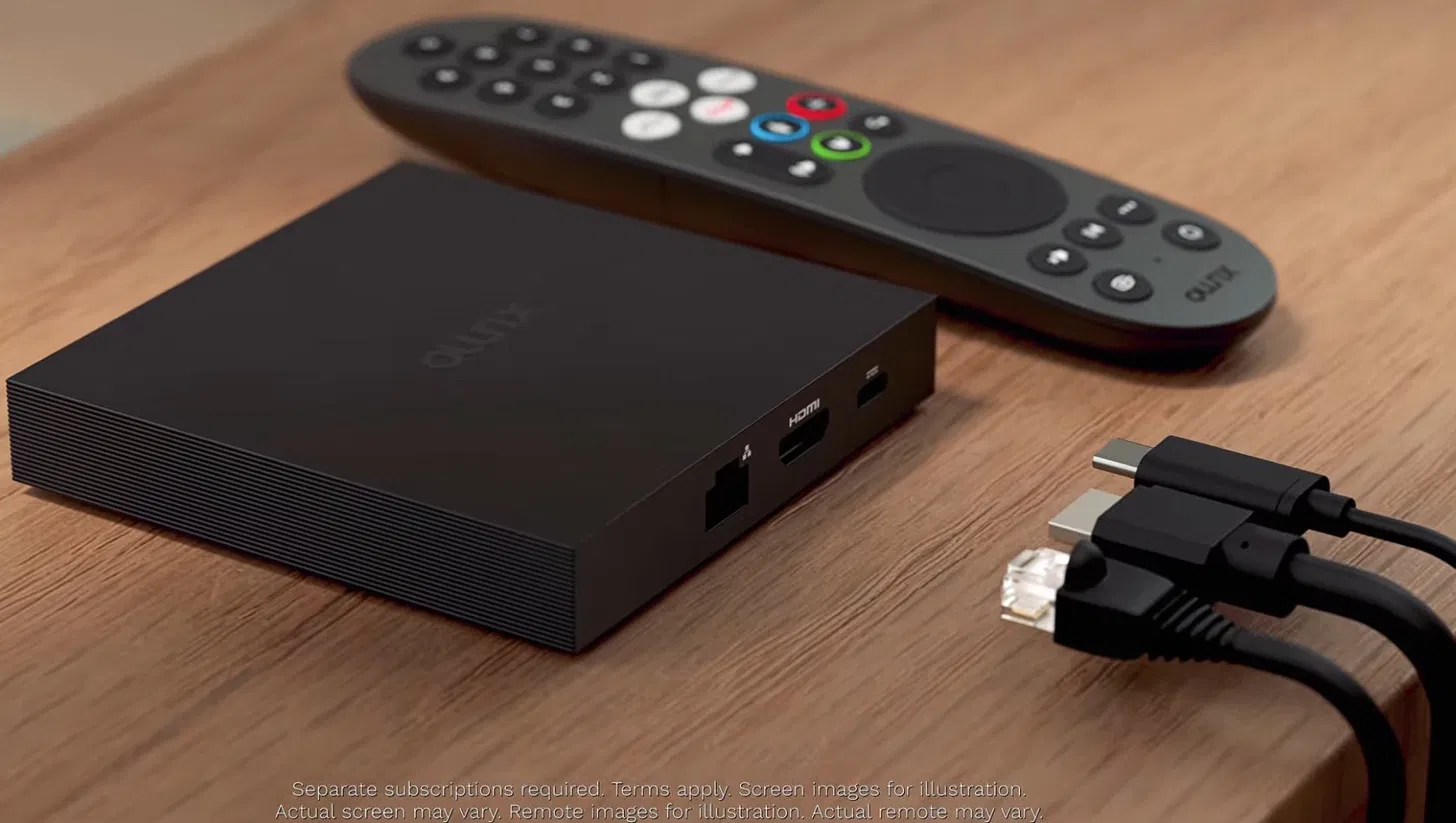
The Xumo Stream Box is a small streaming device about the size of a deck of cards. It plugs into an HDMI port on your TV and connects to the internet through WiFi or Ethernet. There is no coax cable, no wall plate, and no professional installation required (Spectrum supports both self-install and technician install for the box).
Spectrum delivers your TV service through the Spectrum TV app, which comes pre-installed on the Xumo. Alongside that, the box has a pre-loaded catalog of more than 300 streaming apps available through the Xumo interface: Netflix, HBO Max, Disney+, Hulu, Prime Video, Peacock, YouTube, and so on. You sign into whichever ones you already have, and they're available without going to an app store.
Setup runs from your phone. During activation the box asks you to sign in with the My Spectrum app, so have it installed and logged in before you start. Adding your streaming services afterward is quicker than typing passwords on a remote, because each app displays a QR code on screen that you scan with your phone to log in automatically.
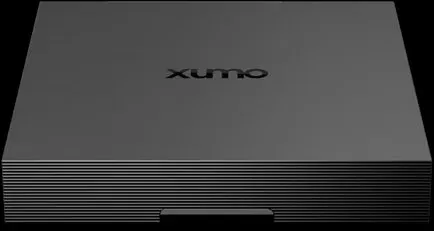
The Spectrum Xumo Stream Box. No front display, no physical buttons, just a flat slab with the Xumo logo. Image: Xumo / Spectrum.
Rear ports: Xumo vs cable box
The clearest way to see what's different about the two boxes is to look at the back. The cable box needs a coaxial cable from the wall. The Xumo doesn't.
Xumo Stream Box (rear)
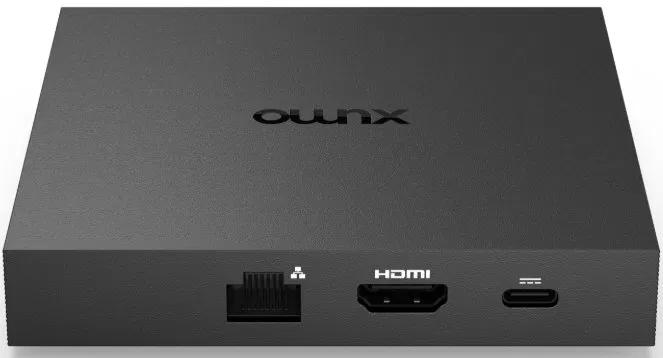
Three ports: Ethernet (left), HDMI (center), and the barrel power connector (right). No coaxial input. Image: Xumo / Spectrum.
Spectrum cable box (rear)
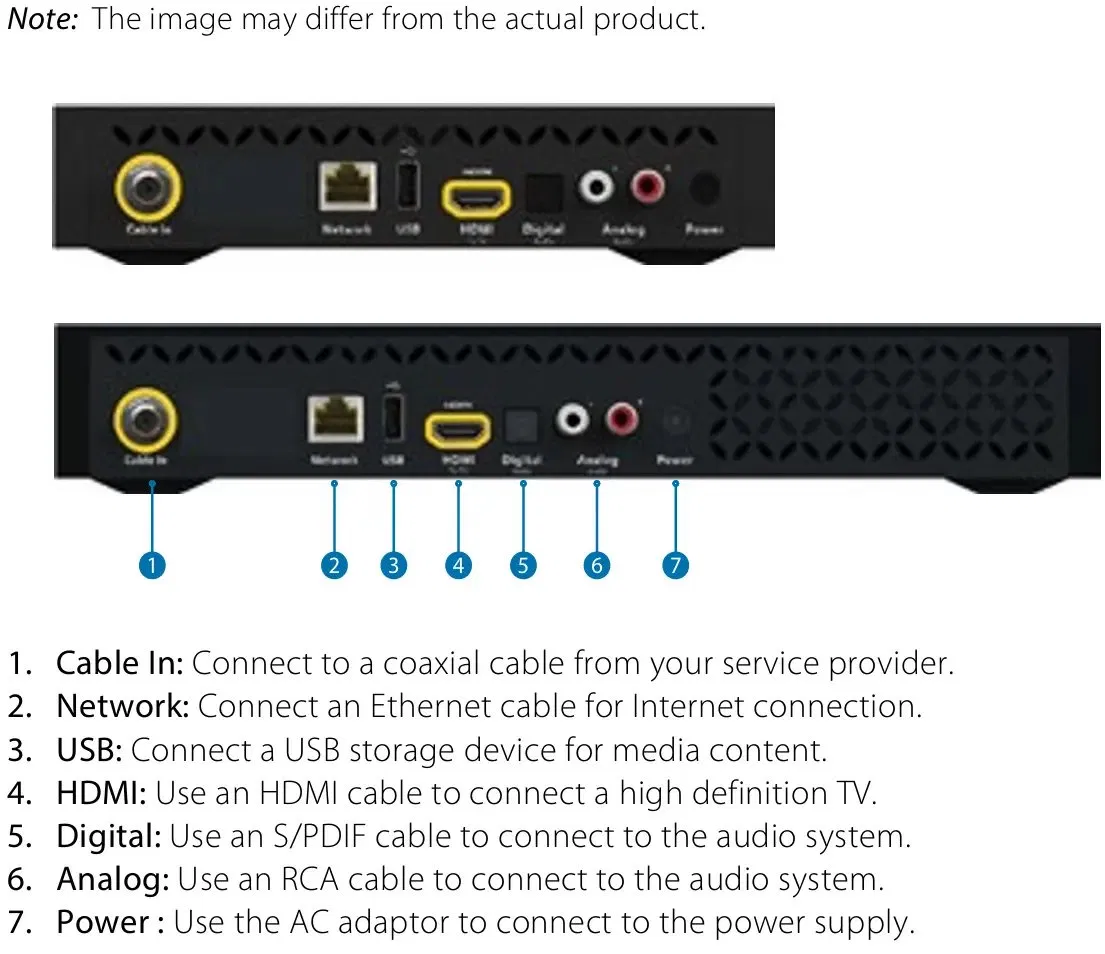
The Cable In port (coax) on the far left is the requirement that ties this box to a Spectrum wall installation. The Digital and Analog audio outputs are what enable surround sound on the cable box, covered later in this guide. Image: Spectrum.
Xumo Stream Box hardware specs
Here are the specs for the Xumo Stream Box itself. For the cable box, Spectrum doesn't publish a single spec sheet. The model you get depends on what's deployed in your market.
| Feature | Xumo Stream Box |
|---|---|
| Dimensions | About 3.75 by 3.75 by 0.75 inches |
| Processor | Quad-core ARM |
| Storage | 8 GB onboard |
| Video output | HDMI 2.1 |
| Wired networking | 10/100 Ethernet |
| Wireless | Dual-band WiFi 6 (2x2 802.11ax), Bluetooth 5.0, IR |
| Power | Barrel connector (use only the supplied adapter) |
| Max resolution | 4K HDR @ 60fps |
| HDR formats supported | HDR10, Dolby Vision |
| Audio formats supported (hardware) | Dolby Digital, Dolby Digital Plus, Dolby AC-4, Dolby Atmos, Dolby Multistream MS12 |
| Pre-loaded apps | 300+ available through the Xumo interface |
| Required service | Spectrum Internet |
| Initial setup | Xumo account required during activation |
| Data usage | Streaming counts against your home internet data |
Source: Xumo's official Xumo Stream Box product page, retrieved May 2026. Provider-issued units (Spectrum, Xfinity, Cox, Mediacom, GCI) ship the same hardware family; check your box's settings menu or rear-panel label for the exact model identifier if you need an authoritative reference for your unit.
Channel lineup: identical to the cable box, when you're at home
The channels you receive on a Xumo Stream Box are the channels on your Spectrum TV package. If your package gives you ESPN on channel 32 in your market, the Xumo gives you ESPN on channel 32. Local channels, regional sports networks, premium channels like HBO and Showtime, and your full Spectrum TV Select Signature or TV Stream lineup all carry over unchanged. You can look up the exact channel lineup for your city on our Spectrum lineup pages.
Two caveats worth knowing:
Away from home, the lineup may shrink. Spectrum's TV app restricts some channels and on-demand content when you're not connected to your Spectrum home internet. If you take the Xumo to a hotel, an Airbnb, or a second home, Netflix and other streaming apps work normally. Some Spectrum channels may not be available. This is a Spectrum app limitation, not a Xumo box limitation. It applies whether you use the Xumo, a Roku, or any other device with the Spectrum TV app away from home.
Channel numbers are tied to your market. The Xumo uses the same market-specific numbering as your cable box, so the same channel can have different numbers in different cities. If you've ever wondered why, we have a separate guide on why channel numbers differ by city.
Xumo Stream Box vs cable box at a glance
For readers who want the short version, here's the side-by-side comparison.
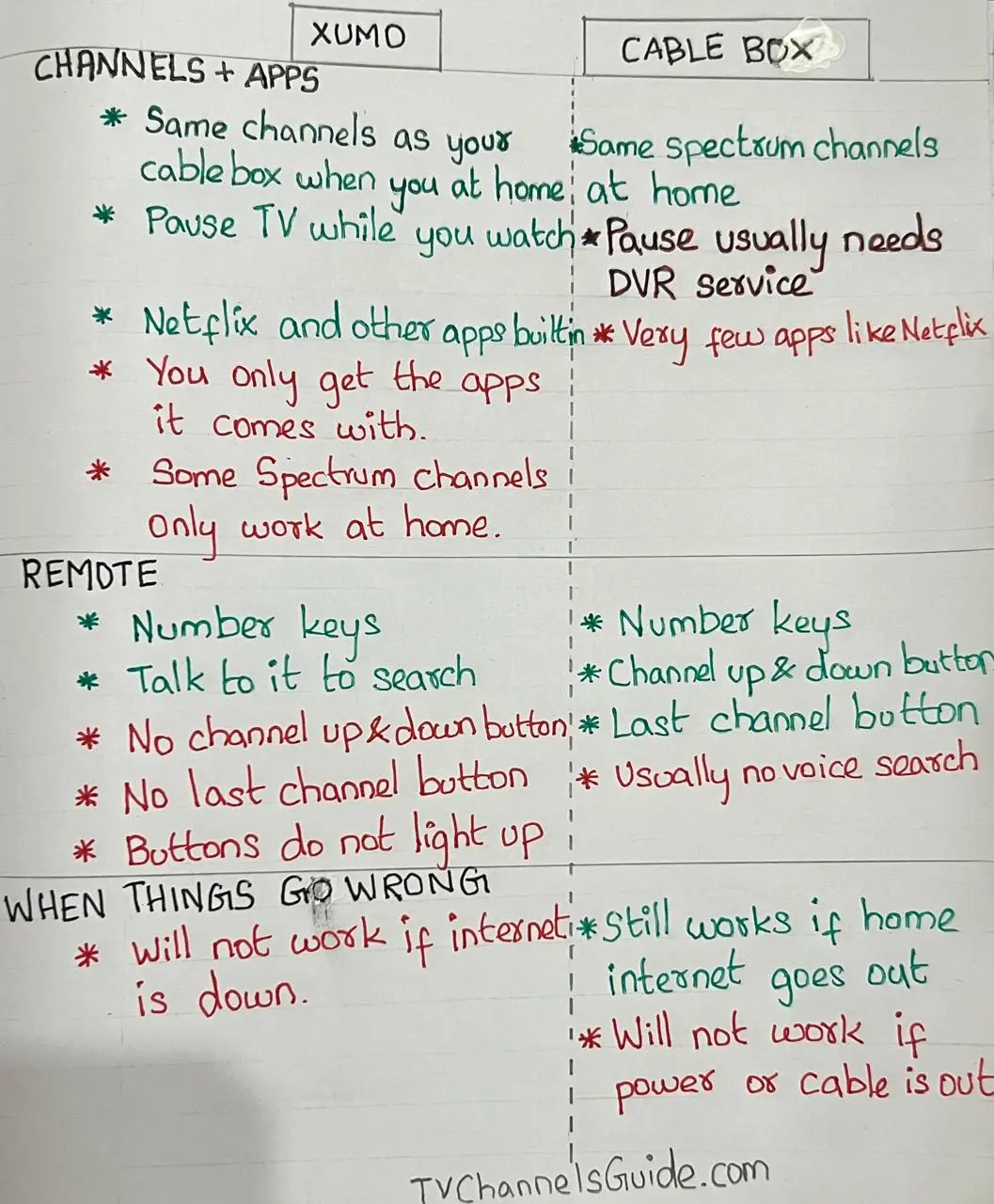
Comparison chart showing Spectrum Xumo Stream Box vs cable box differences in channels, apps, remote, and what happens when things go wrong.
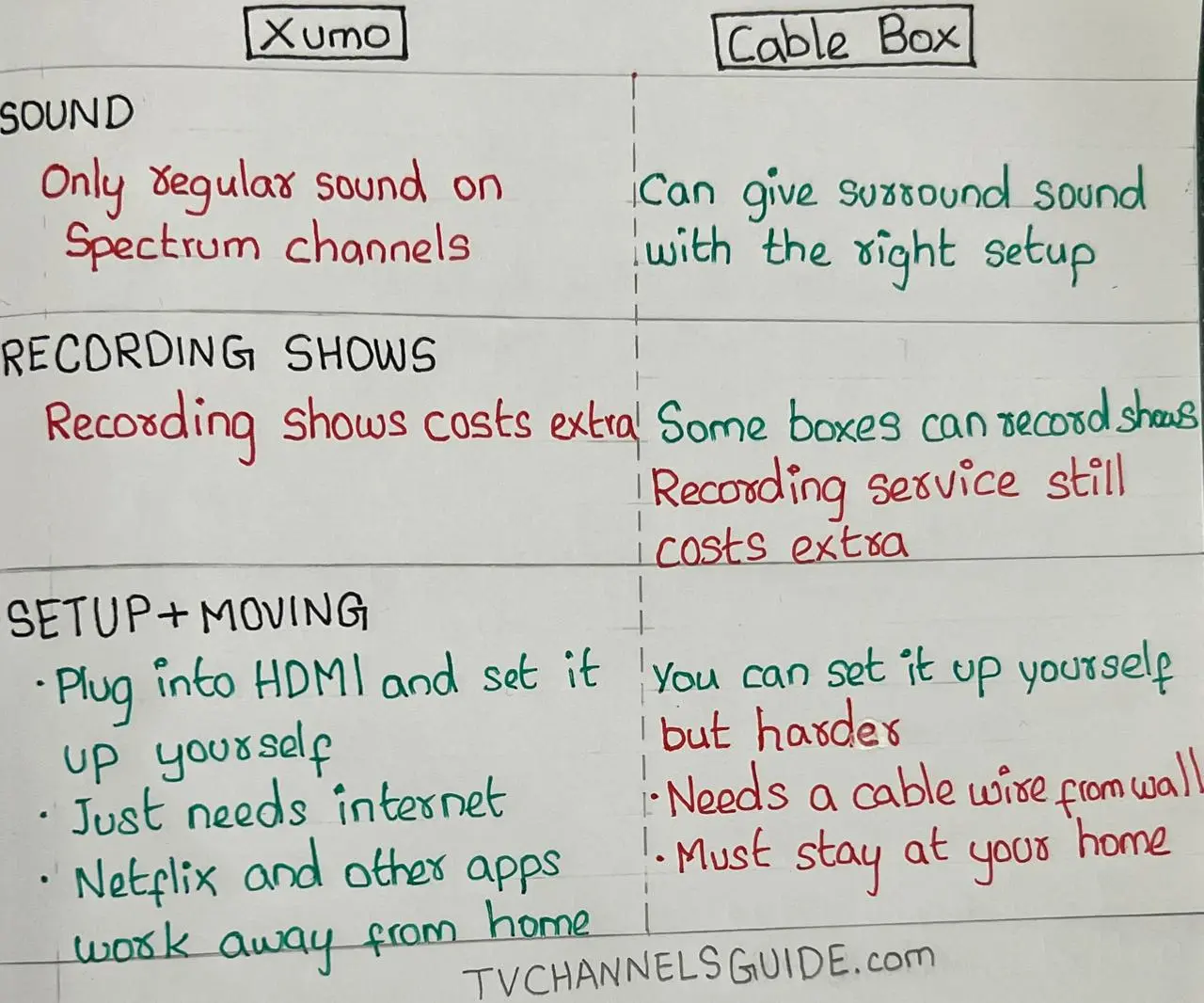
Comparison chart showing Spectrum Xumo Stream Box vs cable box differences in sound, recording, and setup.
Quick reference table
The same comparison in text form, for skimming and screen readers.
| Category | Xumo Stream Box | Spectrum cable box |
|---|---|---|
| Channels (at home) | Same lineup as your Spectrum TV package | Same lineup as your Spectrum TV package |
| Channels (away from home) | Some channels restricted by Spectrum app | Not portable; tied to home address |
| Streaming apps | 300+ pre-loaded; no app store | Limited; Netflix on channel 2001 on select models |
| Remote | Voice remote with number keypad, no LAST button, no CH+/CH- outside guide | Standard cable remote (RC 122) with CH+/CH-, LAST, page jump |
| DVR | Spectrum Cloud DVR add-on only; no local storage | Local DVR on select models, or Cloud DVR add-on |
| Audio (Spectrum TV) | Stereo on live channels; EAC3 on Video on Demand (since late 2024) | Dolby Digital 5.1 with compatible receiver |
| Audio (streaming apps) | Up to Dolby Atmos depending on app | Limited streaming app audio support |
| Internet dependency | Won't work without home internet | Works during internet outages |
| Power dependency | Stops working in power outage | Stops working in power outage |
| Installation | Self-install over HDMI; no coax | Requires coax wall connection |
| Moving between homes | Portable; works at any Spectrum Internet address you sign into | Tied to your service address |
The shorter version of the shorter version: Xumo is better if you want apps, easier setup, voice search, and a modern TV experience. A cable box is better if you want classic channel surfing, surround sound, traditional DVR behavior, and TV that can keep working when home internet is down.
What the Xumo Stream Box does better than a cable box
The Xumo's strongest advantages over a cable box are portability, app integration, voice search, and a one-device experience for both cable and streaming.
No coax cable, no installer needed. The box runs entirely over your internet connection. Self-install is straightforward if you've already got Spectrum Internet.
Portable in a way a cable box isn't. The Xumo is just an HDMI device that needs internet. You can take it to a friend's house, a hotel, an Airbnb, or a second home and sign into your Spectrum TV app there. Streaming apps like Netflix and Disney+ work normally anywhere with internet. The cable box is wired into your specific Spectrum coax installation and physically can't move; Spectrum's terms also tie cable equipment to your service address.
One device for cable and streaming. Switching from Spectrum TV to Netflix doesn't mean changing inputs or picking up a different remote. Everything lives on the same home screen.
Number keys on the remote. Unlike a Roku or Apple TV remote, the Xumo voice remote has a numeric keypad. You can type a channel number to jump directly to it, the same way you would on a cable remote.
Voice search across apps. Holding the microphone button and saying a show or movie name searches across the apps installed on the box, not just within Spectrum TV. Voice handles finding and opening content, not playback. You can ask it to open an app or pull up a title, but pausing, stopping, and rewinding still happen from the buttons on the remote.
Pause and rewind live TV. Pressing OK during live TV pauses the broadcast through a live-TV buffer in the Spectrum TV app for up to 30 minutes. Pressing Left rewinds back through the buffer. This was a long-missing feature on the Spectrum TV app and now works on the Xumo specifically.
Smaller and quieter than a cable box. The Xumo Stream Box measures about 3.75 by 3.75 by 0.75 inches and has no fan.
Where the Xumo Stream Box falls short of a cable box
The Xumo's three biggest friction points compared to a cable box are the remote layout (which is built for streaming app navigation, not channel flipping), the absence of surround sound on live cable channels, and the loss of TV access during internet outages.
The remote is built for streaming, not channel flipping.
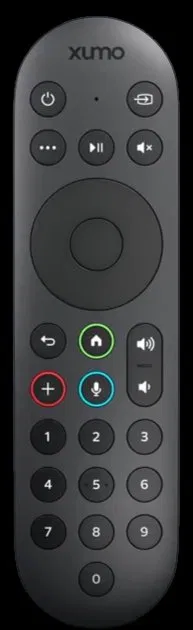
The Spectrum Xumo Stream Box voice remote. Note the absence of dedicated channel up/down buttons and a previous-channel (LAST) button common on traditional cable remotes. Image: Xumo / Spectrum.
Three specific things the Xumo remote does not do that the standard Spectrum cable remote does:
- No dedicated channel up/down button outside the guide. The Spectrum RC 122 cable remote has CH+ and CH- buttons that work from any screen. The Xumo remote does not. To change channels without typing a number, you open the guide first, then scroll.
- No page up/down in the guide. Inside the Spectrum TV guide on Xumo, scrolling moves one channel at a time. The cable box guide lets you jump by a page. With a few hundred channels in a typical lineup, this matters.
- No previous-channel toggle. The cable remote has a LAST button that flips back to the channel you were on a moment ago with one press. The Xumo remote has no equivalent. Spectrum's workaround is to press down on the directional pad and then OK, which is three button presses for what used to be one.
For viewers who flip between two games during commercials, or who channel-surf casually, this is the most-reported friction point with the Xumo. The remote was designed around streaming app navigation rather than the channel-flipping habits cable subscribers have built up over decades.
Xumo remote cheat sheet for Spectrum TV
What you want to do What to press Open the mini guide while live TV keeps playing Press Right Open the full guide Press Right, then choose Full Guide See the previous channel and recently watched shows Press Down Record or see program options Press Up Pause live TV Press OK Rewind live TV Press Left Go back to the Spectrum TV app home screen Press Back Jump to a known channel Type the channel number These shortcuts make the Xumo easier to live with, but they are workarounds. The remote still feels different from a traditional cable remote if you are used to channel up/down, page jumping, and one-button previous-channel flipping.
Less information in the guide. The Xumo guide shows the program name and time slot but not the full episode description or a "new episode" indicator. The cable box guide carries more detail.
No app store. The Xumo ships with 300+ pre-installed streaming apps, but it is not an open app-store device like a Roku, Fire TV, or Apple TV. If a service you use isn't already on the box, there is no way to download it yourself. Spectrum and Xumo do add new apps over time, but on their schedule, not yours. (Cable boxes also have limited streaming app support. Netflix is available on select Spectrum cable boxes through channel 2001. But the Xumo's pre-loaded catalog is much broader.)
No clock or display on the box, no backlit remote.
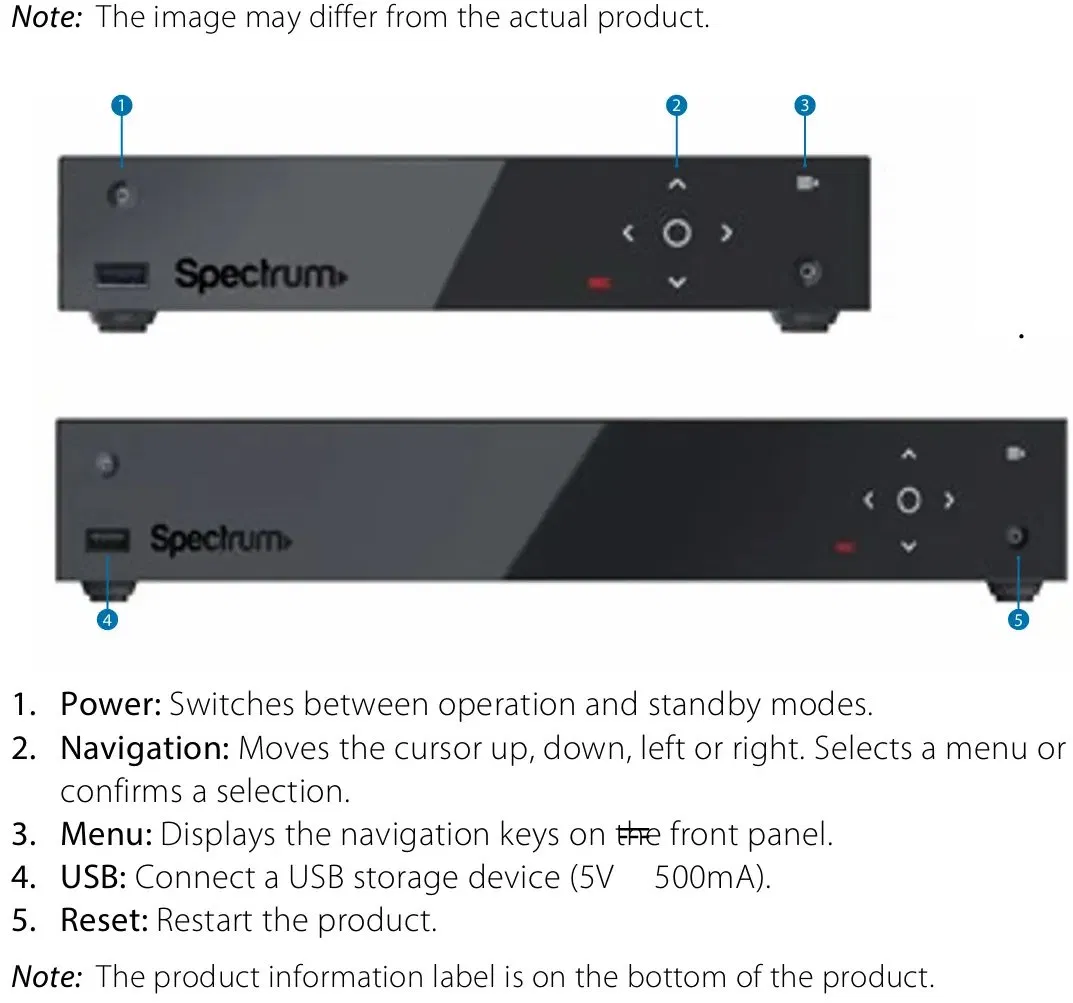
The Spectrum cable box front shows a lighted channel/time display and physical controls. The Xumo box has neither. Your specific cable box model may look different. Image: Spectrum.
The standard Spectrum cable box has a small lighted display on the front showing the channel and time. The Xumo box has no front display at all. The Xumo remote buttons aren't backlit. For evening viewing in a dark room, this is a daily friction point that wasn't there before.
Stereo audio only on Spectrum TV through Xumo. This is the most significant technical limitation, and it's worth its own section.
The audio limitation on Spectrum TV through Xumo
The Xumo Stream Box hardware supports Dolby Digital, Dolby Digital Plus, Dolby AC-4, and Dolby Atmos. Streaming apps like Netflix and HBO Max can use those formats on the box.
The Spectrum TV app cannot, at least not on live channels. Live TV through the Spectrum TV app on the Xumo Stream Box plays in stereo only.
Spectrum has acknowledged this directly in their community forums. A Spectrum representative confirmed in early 2024 that "the Spectrum TV app still only has stereo audio, Xumo included." A Spectrum tech support agent (relayed in the same thread) attributed the limitation to Dolby licensing costs for streamed broadcasts.
There's been one improvement worth noting. As of late 2024, Spectrum added Dolby Digital Plus (EAC3) support for Video on Demand content in the Spectrum TV app. Live broadcast channels remain stereo-limited.
The same restriction applies to the Spectrum TV app on a Roku, Fire TV, Apple TV, or any other streaming device. This is a Spectrum app issue, not a Xumo hardware issue.
Sources for the audio limitation: discussions on Spectrum's official community forum (employee-confirmed), a follow-up Spectrum Community thread noting the late-2024 VOD-only EAC3 addition, and AVS Forum's deep technical discussion for home-theater specifics.
If you have a 5.1 or 7.1 surround sound system, this is the single biggest reason to think twice. The Spectrum cable box, paired with a compatible receiver and surround setup, can pass Dolby Digital 5.1 on channels that broadcast in surround. Switching to Xumo means downmixing that to stereo for live Spectrum channels.
Streaming apps on the Xumo are unaffected. On-demand Spectrum TV content now passes EAC3. Only live cable channels through the Spectrum TV app stay stuck at stereo.
Who the Xumo Stream Box suits
The fit is good if:
- You watch a mix of cable TV and streaming apps and want one device for both
- You don't currently use surround sound or you're fine with stereo for live TV
- You navigate by typing channel numbers or using voice search rather than flipping channels
- You want to skip an installer visit and avoid running coax to a new TV location
- You travel and want streaming apps to come with you
The fit is poor if:
- You rely on channel up/down for casual channel surfing
- You have a 5.1 home theater setup and watch a lot of sports, news, or live broadcasts where surround sound matters
- You depend on a cloud DVR with detailed episode information in the guide
- Your internet connection is unreliable. The Xumo loses functionality entirely when the network drops, where a cable box keeps working over coax until power or signal is lost
⚠️ Do not switch to the Xumo if you rely on Dolby surround sound from live Spectrum TV, classic DVR behavior with local recording, channel up/down surfing without the on-screen guide, or watching TV during home internet outages. The Spectrum cable box handles all four; the Xumo handles none.
How to make the Xumo feel more like a cable box
If you're moving someone off a traditional cable box, spend a few minutes in the Spectrum TV app before judging the Xumo. Most of the early frustration comes from defaults, not from anything the box is missing.
Set a startup channel first. In the Spectrum TV app, go to Settings, then Preferences, then Startup Channel, then Manage Startup Channel, and turn the toggle on. Pick the channel the household watches most, from Favorites or the full lineup. This won't make the Xumo box skip its own home screen, but it makes the Spectrum TV app open on a familiar live channel instead of a menu once you reopen it. With the toggle off, the app instead reopens on the last channel you were watching.
Next, build a Favorites list. Add the channels the household actually watches, then open the Guide and use the down-arrow icon in the top corner to filter the guide down to those favorites. Scrolling a short favorites list is far less daunting than scrolling past hundreds of channels.
Finally, teach a few remote moves rather than the whole layout:
- Type the channel number if they know it.
- Press Right to open the guide while the current channel keeps playing.
- Press Down to pull up recently watched channels.
For an older viewer or a long-time cable user, this short setup changes the experience more than any hardware spec does. One catch worth flagging up front: you have to set the startup channel again on each new device, because the preference doesn't follow your account automatically.
Common questions
Do I need one Xumo Stream Box per TV?
Yes. One Xumo box serves one TV. If you have three TVs and want Spectrum TV on all of them, you need either three Xumo boxes, three cable boxes, or a mix. Some Spectrum sales reps have told customers a single Xumo can replace multiple cable boxes; that isn't accurate. That said, Spectrum no longer requires you to keep at least one cable box in the home at all. You can run the Spectrum TV app on a compatible streaming device, including a smart TV that already has the app installed, on every television, so a household can drop physical boxes entirely if it chooses to.
How do I set up a Xumo Stream Box?
Plug the box into an HDMI port and a power outlet, then switch your TV to that HDMI input. The remote pairs during the on-screen setup, and you connect to your home WiFi from there. Have the My Spectrum app installed and signed in on your phone before you start, because activation uses it. To add your streaming apps afterward, each one shows a QR code on the TV that you scan with your phone to log in, so you don't have to type passwords on the remote. Spectrum supports both self-install and a technician visit if you'd rather not do it yourself.
Will I lose any channels by switching from a cable box to a Xumo?
At home, no. The Xumo Stream Box uses the Spectrum TV app, which carries the same channel lineup tied to your Spectrum TV package. Local channels, regional sports networks, and premium channels all transfer. Away from your home internet, some channels may be restricted by Spectrum's licensing rules. To compare specific channel availability across providers in your city, browse our provider hubs for Spectrum, Xfinity, Cox, and Optimum.
Can I keep my cable box and get a Xumo for a second TV?
Yes. Spectrum allows mixed setups. Many subscribers keep a cable box on their main TV for surround sound and DVR access and use a Xumo on a secondary TV.
Does the Xumo work without Spectrum Internet?
For Spectrum TV, no. The box requires an active Spectrum Internet connection to stream the Spectrum TV app at full functionality. You can use it with other internet providers for streaming apps only (Netflix, Prime Video, and so on), but the full Spectrum TV experience needs Spectrum's home internet connection.
Can I buy a Xumo Stream Box without being a Spectrum customer?
Yes. The Xumo Stream Box is sold directly through Xumo.com as a standalone streaming device. Without a Spectrum or Xfinity subscription, you lose the cable TV side of the experience but you still get the 300+ pre-installed streaming apps, the voice remote, and 4K HDR playback. Some users report a better experience with a Xumo bought directly from Xumo rather than from a cable provider, because cable-provider boxes are sometimes refurbished units.
Is the Xumo channel number the same as my cable box channel number?
Yes. Channel numbers are tied to your Spectrum market and package, not to the device. ESPN on channel 32 on your cable box is ESPN on channel 32 on your Xumo. If you're trying to find a specific channel number, our how to find your channel number guide walks through it.
Can the Xumo open straight to live TV like a cable box?
Not in the same way. The Xumo powers on to its own streaming-style home screen rather than a cable tuner, and even inside the Spectrum TV app you land on a home view rather than a live channel by default. You can get closer to the old behavior by setting a startup channel in the Spectrum TV app, which makes the app open on a channel you pick each time you sign in and relaunch it. With that turned off, the app instead reopens on the last channel you were watching. Neither is identical to a cable box that lights up directly to live TV, so for a viewer who expects the screen to show cable the instant the set comes on, this is one of the bigger adjustments.
Can I flip back to the previous channel with one button on the Xumo remote?
No. The Xumo remote does not have a LAST or previous-channel button. The standard Spectrum cable remote does. To return to the channel you were just watching on the Xumo, press down on the directional pad and then OK to select it from the recent-channels list.
Can I record shows on a Xumo Stream Box?
The Xumo box has no built-in DVR storage, so recording works differently than it does on a traditional cable box. A cable-box DVR stores recordings on a hard drive inside that one box, can usually record only two programs at the same time, and keeps those recordings tied to that single TV. Spectrum's Cloud DVR, the add-on the Xumo uses, stores recordings on Spectrum's servers instead, records many more programs at once, and lets you watch them on any device signed into the Spectrum app. It comes in two tiers that differ in how many simultaneous recordings you get and how long recordings are kept. Recording requires this paid add-on on top of your Spectrum TV plan. Without it, the record button on the remote does nothing. Spectrum publishes current limits and retention windows on their support site.
What happens to my Xumo rental if I never cancel it?
The rental charge continues until you call Spectrum to stop it. If you bought the box outright instead of renting, there's no recurring charge. If your account terms include an option to own the box after a set number of monthly payments, confirm that in writing on your account, otherwise the charge keeps running indefinitely.
How do I return a Xumo Stream Box to Spectrum?
You can return Spectrum equipment, including a Xumo Stream Box, at any Spectrum store with no appointment needed, or ship it back through UPS using a return label generated from your Spectrum online account. Keep the receipt or tracking number until the return clears your account, since unreturned-equipment fees can hit weeks later. After return, call Spectrum to verify the rental charge has been removed from your billing.
Does the Xumo support 4K and Dolby Atmos?
The hardware supports both. Whether a specific app or channel delivers 4K or Atmos depends on the app and the content. Live channels through the Spectrum TV app on Xumo are stereo only; on-demand Spectrum content can pass EAC3 (Dolby Digital Plus) as of late 2024. Streaming apps like Netflix, Disney+, and HBO Max can use Atmos and 4K when the content supports it.
Should I get a Xumo or a Roku for Spectrum?
Both run the Spectrum TV app. The differences come down to: the Xumo has number keys on its remote and supports pause-live-TV through the Spectrum app; the Roku has a more open app store and broader third-party compatibility. If you channel-surf by number or use Spectrum TV heavily, the Xumo edges ahead. If you mostly stream and only occasionally watch Spectrum, a Roku is more flexible. Spectrum's stereo-only audio limit applies on both devices.
Summary
The Xumo Stream Box delivers the same Spectrum channel lineup as a traditional cable box for subscribers at home. It trades the cable remote's channel-surfing buttons and surround sound for streaming apps, voice search, pause-live-TV, and portability. If you're a casual viewer or a household that already streams more than they channel-flip, the trade-off is favorable. If you're a sports fan with a home theater setup or a subscriber who relies on muscle memory from decades of cable remotes, the cable box may still be the better fit.
For most Spectrum subscribers, the Xumo isn't an upgrade or a downgrade. It's a different shape of the same service, designed for a household that streams Netflix and watches cable from the same device. Whether it suits you depends on what you actually do with your TV.
Manikandan Kannan is the founder of TVChannelsGuide, a US TV channel lineup database tracking carriage across all major cable and satellite providers. He has been building independent web properties focused on TV and consumer-tech information since 2010.